

Here’s a call we get all the time. A founder says they’ve built the first version of their product in Bubble, it’s working, customers like it, and now it’s falling over. Pages crawl, the monthly bill doubled, and the one feature their biggest client asked for? The platform can’t do it.
That’s usually when they find us. We build things with Laravel, so yes, we have a horse in this race. But we also tell people to stay on no-code when it makes sense, because sometimes it really does. This post is about figuring out which side of that line you’re on.
Key Takeaways
- No-code is great for testing an idea. It’s cheap and fast, and you lose very little if the idea flops.
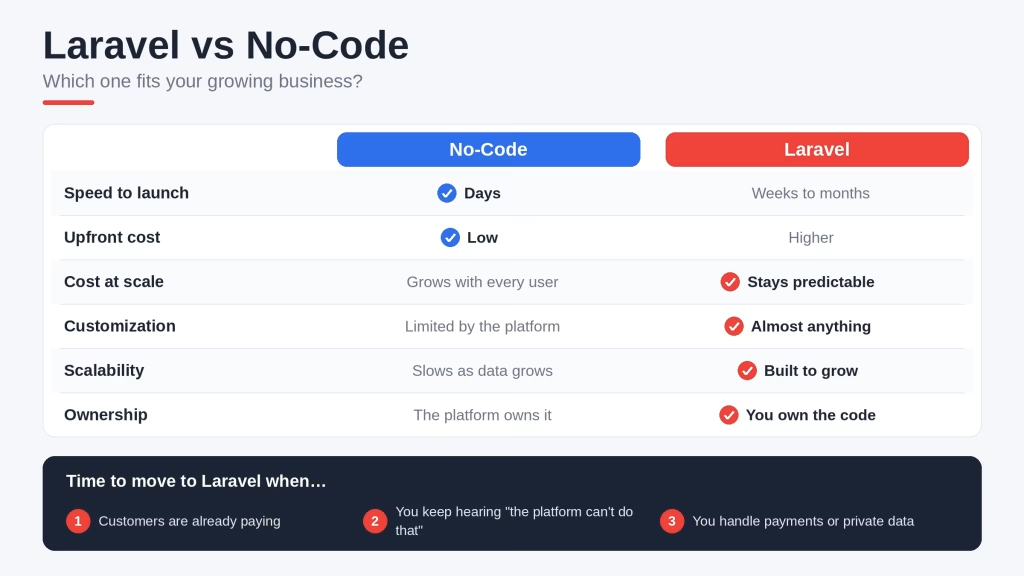
- Most no-code platforms charge more as you grow, so a plan that feels cheap at 300 customers can hurt at 15,000.
- If you keep hearing “the platform can’t do that,” you’re probably outgrowing it.
- Laravel costs more at the start, but you own the code, and your costs stop climbing with every new customer.
- If you’re handling payments or private customer data, custom development is usually the safer way to go.
- Starting with no-code and moving to Laravel later is completely normal. Just plan the move before things get painful.
The Short Answer
Use no-code to find out if people want what you’re making. Use Laravel once you get the idea of that. Plenty of businesses end up doing both, in that order, and honestly that’s usually the smart way to go.
What’s No-Code and What it Does Well
You build with visual tools instead of writing code. Webflow, Airtable, Zapier, Bubble. You drag, you connect, you publish.
A friend of mine launched a booking site over one weekend. No developer. It cost her about what she’d spend on groceries for two weeks. If that idea had flopped, she’d have lost almost nothing, and that’s the whole point. For a prototype, a simple internal tracker, or a landing page with a form, nothing beats it.
So if you’re still guessing whether anyone will pay, don’t go hire a Laravel developer yet. Seriously. Save the money.
Where it can hurt
Pricing: This is the first thing people notice. Most platforms charge by users, records, or workflows run, so a plan that felt cheap at 300 customers can get painful at 15,000. By then you’re so deep in the tool that leaving feels impossible.
The wall: Say you need an approval chain with five different user roles. Or a sync with your accounting software that the platform doesn’t support. You find a workaround, then another one on top of that, and eventually you’ve got something held together weakly. Nobody wants to touch it.
Speed: More data means a slower app.
Ownership: People forget about this until it bites. If the platform changes its rules or its prices next year, you just live with it.
What’s Laravel and What it Does Well
Laravel is a PHP framework. If that means nothing to you, think of it as a starter kit developers use to build custom web apps. Logins, databases, the basic security stuff, most of it is already there when we begin, so we’re not pouring the foundation from scratch every time. That’s a big reason why Laravel web development is so common, from small client portals to platforms with real traffic. We’ve used it on several projects over 15 years, and it’s the one we keep going back to, mostly because nothing about it is limited. You can build almost any feature you need, it bends to fit how your business works, and it keeps up when you grow.
What it gives
The code belongs to you. You can host it anywhere and change anything. If you part ways with your team, another developer can pick it up, which is a relief you don’t get on most no-code platforms.
Trade-offs
You’ll spend more at the start. That’s just true. But your costs stop climbing every time you land a new customer, and that matters a lot after the first year or two.
How to Tell Which One You Need
Are people already paying you? If not, stick with no-code a bit longer. Right now your biggest risk is building something nobody wants, and no-code is the cheapest way to find out.
How often do you hear “the platform can’t do that”? Once or twice, fine, everyone hits that. Every month? That’s a sign. If you’re chaining three tools together just to get one feature working, you’ve probably outgrown the platform.
What happens to your costs as you grow? Work out what your plan would cost at ten times your current users. If the bill climbs faster than your revenue, custom development often works out cheaper within a year or two.
What data are you holding? An email list is one thing. Payments or medical details are another, and so is anything regulated. Custom development is usually the safer bet there, because you control where the data lives and who can reach it.
Do you need to own what you’ve built? If you plan to raise money, sell, or hand the product to a new team, the code matters. With no-code, you’re often renting it.
A simple way to decide
Still testing the idea? Stay on no-code. People paying, platform pushing back, costs or data getting harder to manage? Time to talk to a developer. You don’t have to rebuild everything at once, and plenty of teams keep the no-code tool for the parts that still work.
Can You Start Small and Move Later?
Yes, and a lot of people do. Build the quick version, watch what customers actually use, and then rebuild the useful parts properly. The catch is that moving your data takes planning, and rushed migrations are where things go missing. So talk to a Laravel developer before it gets painful. Not after.
Choosing a Team for Laravel Development Services
If you’re shopping around, my advice is to skip the sales pitch and ask to see something they actually built. A list of skills tells you very little. Then ask what happens after launch, because that’s where a lot of teams disappear, and every app needs updates sooner or later. One more thing. If they can’t explain what they’re doing without a pile of jargon, take that seriously. If you hang up more confused than you started, trust that feeling. Explore our Laravel Development service.
Conclusion
So which one is better? Neither, really. It depends on where your business is right now.
If you’re still testing an idea, no-code will save you time and money, and there’s nothing wrong with starting there. But if customers are paying, the app is slowing down, and you keep running into walls, it’s probably time to look at Laravel development. The worst thing you can do is wait until everything is already breaking.
Not sure which side you’re on? Talk to a Laravel developer.
Questions We Hear a Lot
Is Laravel better than no-code?
Depends where you are. Testing an idea? No-code. Need custom features, lots of users, and full control? Laravel.
How long does it take?
A few weeks for something small. A few months for something bigger. Mostly it depends on how many features you want.
Can a no-code app be moved to Laravel?
Yes. It means rebuilding it and moving your data over, and it goes a lot smoother if you plan ahead.
Do I need a full-time Laravel developer?
Usually no. Most growing businesses hire a team for the build and keep them around for updates.