
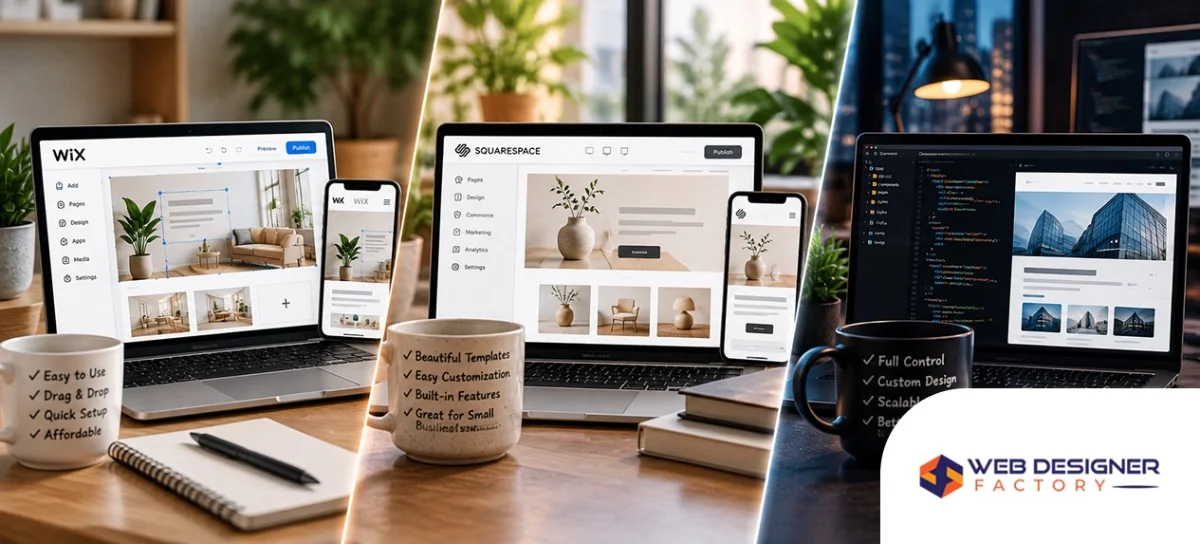
With 15 years in web design, there are a few things we see again and again, and this is one of them: Wix, Squarespace or a custom website? The confusion never goes away, because the answer is never that simple. None of the three is right for every business.
So in this guide we’ll cover the factors that matter. What does your business need to look like for Wix to work best? When does Squarespace make more sense? And when is a custom website the better choice, because you need it to do more than a template can?
We’ll go through everything, head to toe, so you’re not left confused. Then you can spend your time on the option that fits where your business is standing today.
Quick note before we start: we build custom websites on WordPress, Shopify and BigCommerce, so we’re not a neutral party. To keep this fair, we’ve used published pricing, Google’s own guidance and our own cost data, and we’ve told you where builders are the better choice.
Quick Answer
If your website just needs to be there, so people who already know you can find your phone number and hours, Wix or Squarespace will do the job.
If you need it to bring in new customers, a builder will probably start to feel tight sooner than you expect. That’s when a custom site starts to make sense.
And between the two builders? Wix if you like to tinker. Squarespace if you want it to look good without making a hundred decisions.
Key Takeaways
- Builders win on monthly price. A custom site wins when your website is how you get customers.
- Wix gives you freedom. Squarespace gives you polish.
- Leaving either one later means more rebuilding than most people expect, Wix especially.
- Speed and SEO control matter more the more competitors you have. Test your own site, don’t guess.
- Think two years ahead, not just launch day.
About Wix
Wix launched in 2006 in Tel Aviv. The idea was simple: building a website shouldn’t be this costly and this hectic. Almost twenty years later it’s one of the biggest names in the space. It does a lot well, it has real drawbacks, and it isn’t right for every business. Let’s cover both sides.
What Wix Is Best At
Start with the freedom. You can put things almost anywhere on a Wix page, so if you can picture the layout, you can usually build it. That’s the big reason people pick it.
It’s also fast. A basic site can be live in a few days. Online payments, bookings and a store are built in, and if you need something extra, there’s an app for it. There’s a free plan and a free trial too, so trying it costs you nothing.
Where Wix Falls Short
The one most people don’t see coming is leaving. Wix doesn’t give you a way to export a whole site, so moving to WordPress later means rebuilding pages by hand and setting up redirects so your Google rankings don’t vanish.
Control is the other one. The SEO basics are there. Going deeper, into site structure, schema or code, is harder than on WordPress. Apps are often a monthly cost on top of your plan, so the real price creeps up. And because Wix loads its own code, and every app adds more, your site’s speed is only partly in your hands.
One more thing: all that freedom is easy to misuse. We’ve all seen a site with too many fonts, too many colours and too many moving parts.
What Wix Costs
Going by published 2026 pricing, Wix plans run from about $17 to $159 a month on annual billing: Light $17, Core $29, Business $39, Business Elite $159. Heads up: the cheapest plan doesn’t take online payments, so if you sell anything you’ll probably start at Core. Pay month to month and it costs more.
Wix Works Best If…
You want to launch quickly on a small budget, you like building things yourself, and your site is a simple brochure, a portfolio or a small shop that doesn’t need anything unusual.
About Squarespace
Squarespace is the older of the two. Anthony Casalena started it in 2003 as a student at the University of Maryland, worked on it from his dorm room, and opened it to the public in January 2004. You can still feel that origin today: clean design, and everything in one place.
What Squarespace Is Best At
Squarespace’s big strength is that it looks good almost by default. Even a first-timer’s site tends to look professional, because the templates are well designed and you can’t wander too far from them.
Hosting, templates, blogging and basic store tools all sit under one login, and there are fewer choices to agonise over. That’s why it works well for portfolios, restaurants, studios and simple service businesses.
Where Squarespace Falls Short
The flip side of fewer choices is less freedom. You work inside the template, and if you want something unusual, it can feel tight. There are fewer add-ons than on Wix or WordPress, and leaving later still takes real work, even though it’s easier than leaving Wix.
Also read the plan details. Fees and features change from plan to plan, and the higher plans get pricey if you’re selling online at scale.
What Squarespace Costs
Squarespace plans run from about $16 to $99 a month on annual billing: Basic $16, Core $23, Plus $39, Advanced $99. Monthly billing costs more, and domains and extras are often billed separately.
Squarespace Works Best If…
Looks matter more than features, you want a good result without lots of decisions, and your site is a portfolio, a restaurant, a studio or a simple service business.
About a Custom Website
A custom website is built around how your business actually works, rather than squeezed into someone else’s template. For most small businesses that means WordPress or Shopify, with a designer or agency doing the design, the build and the SEO setup. The part that matters most: you own the site and everything in it.
What a Custom Site Is Best At
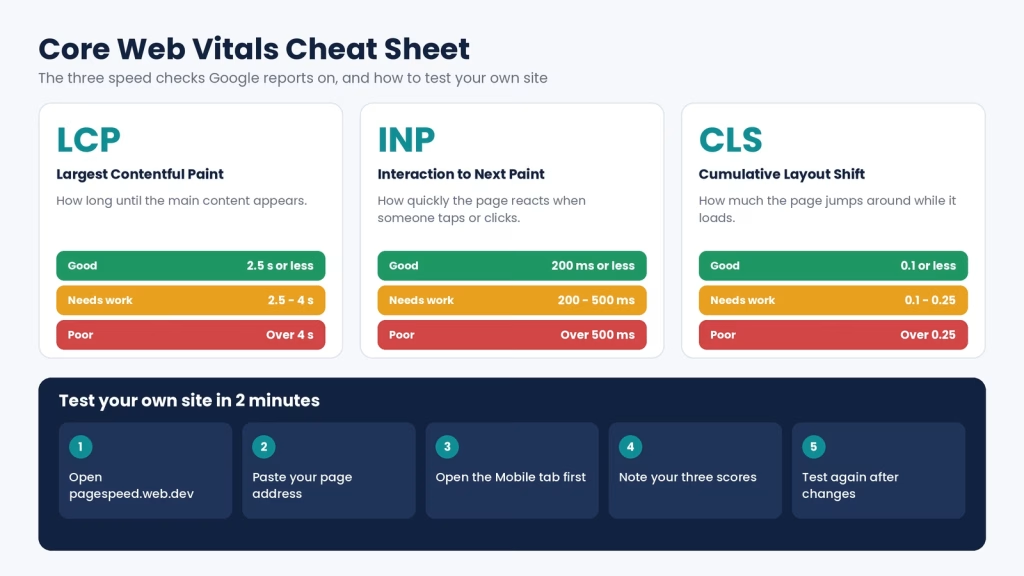
The main thing is control. Layout, speed and features can follow what your business does, instead of what a template allows. Technical SEO, like clean code and schema markup, goes in properly from day one. And you don’t have to take anyone’s word for it, because you can run the site through PageSpeed Insights and compare it with Google’s Core Web Vitals targets: main content loading in 2.5 seconds or less, a response to a tap in 200 milliseconds or less, and layout shift of 0.1 or less.
It’s also easier to connect the tools you already use, like booking systems or quote calculators. And since the files are yours, you can switch developers or hosts later without starting from scratch.
Where a Custom Site Falls Short
Let’s be honest about the downsides. It costs more up front, before the site has earned anything. A standard small business site takes around four to six weeks, so it’s slower to launch. Hosting, security and updates are ongoing, either by you or by someone you hire. And the person who builds it matters: a weak developer can leave you with something harder to run than a builder site.
What a Custom Site Costs
In our Texas small business website cost guide, most professionally built sites cost $2,500 to $15,000, with many landing between $4,000 and $8,000. Ongoing costs usually run about $1,000 to $6,000 a year.
A Custom Site Works Best If…
Your website is a main source of customers, you work in a field where trust matters, you need features a template can’t give you, or you plan to grow.
Wix vs. Squarespace vs. Custom: Side by Side
| Wix | Squarespace | Custom website | |
|---|---|---|---|
| Typical cost | About $17-$159 a month | About $16-$99 a month | About $4,000-$15,000 up front, plus upkeep |
| Time to launch | Days | Days | About 4-6 weeks |
| Design freedom | High | Medium | Highest |
| Technical and SEO control | Basic to moderate | Basic to moderate | Highest |
| Moving later | Rebuild by hand | Partial export | You own the files |
| Best for | Quick, flexible, low budget | Polished and simple | Growth and lead generation |
On plan fees alone, a builder runs about $600 to $1,400 over three years. That’s before domain renewals, paid apps and your own hours. A custom site runs about $7,000 to $33,000 over the same stretch, using our cost guide’s ranges. So yes, DIY wins on price. What matters is what your website has to earn for you.
How to Decide: Five Quick Questions
Ask yourself these five things, and be honest, because nobody’s checking.
- Where will your next customers come from? If the honest answer is Google, or someone searching on their phone, that points one way.
- Do you need anything beyond pages and a contact form? Booking, a quote calculator, a link-up with the software you already use?
- Who’s going to build and look after the site? If it’s you, will you really find the time, or will it sit half done?
- Do people check you out before they buy? That’s common in legal, medical and home services.
- Where’s the business headed in the next two years? New services, more staff, another location?
Mostly no? Start with Wix or Squarespace. Mostly yes? Plan for a custom site. Somewhere in between? Start simple, but own your domain and your content so you can move later.
Mistakes to Avoid, Whatever You Choose
- Picking on price alone. The cheapest option rarely stays cheapest once you count your time and a possible rebuild.
- Building before you plan. Know your pages and your goal first. Our guide to planning a business website walks through it.
- Letting leads go missing. Fill in your own contact form once a month and check the message really arrives.
- Forgetting the phone. Most local customers see your site on a phone first. Here’s why mobile-first design matters.
- Not owning the basics. Register the domain in your own name, and keep your text and photos in a folder you control.
- Never looking again. Check every quarter for broken links, slow pages and old prices. Our list of 17 website mistakes is a good place to start.
When It’s Time to Hire a Professional
You don’t need an agency on day one. Plenty of businesses start on a builder, and that’s fine. It’s time to think about hiring when the website is your main source of customers, you’ve outgrown the template, you’re spending more time fixing the site than running your business, or you simply want to own it outright.
If that sounds like you, take a look at our web design services, our WordPress development or our business website design. If search is your priority, see our SEO and website solutions.
Comparing agencies? Our guide to choosing a website design company lists what to ask. Read more about template-based websites too.
We work with businesses across Texas, including Plano and Dallas. If you’d like a straight answer on whether a builder or a custom site fits, request a free proposal. We’ll tell you if a builder is the better choice.
Frequently Asked Questions
Which is better for a small business: Wix, Squarespace or a custom website?
It depends on what the site has to do. A simple site on a small budget? Wix or Squarespace. A business that lives on leads or sales from its website? Custom.
Is Wix or Squarespace better?
Neither wins for everyone. Wix gives you more freedom and tools. Squarespace gives you a cleaner look with fewer decisions.
Can I start on Wix or Squarespace and move to a custom site later?
Yes, but expect some work. Wix has no one-click full export, so you’ll rebuild pages and set up redirects to keep your rankings.
How much does a custom website cost in Texas?
Most professionally built Texas small business sites cost $2,500 to $15,000, and many land between $4,000 and $8,000. Here’s the full cost breakdown.
Can a Wix or Squarespace site rank on Google?
Yes, especially for less competitive searches. The real question is how much control you’ll want as your competition grows.
About the Author
Abbas Noorani is the founder of Web Designer Factory, a web design and digital marketing agency based in Plano, TX, serving businesses across Texas.